Fixing Ford Explorer Terrain Management System faults
Diagnose and fix Ford Explorer Terrain Management System errors including the wrench warning, software bugs, false sensor codes, and battery-reset procedures.
Most Terrain Management System faults on the Ford Explorer come from one of three things: a stored software glitch that clears with a battery reset, a failing wheel speed or yaw sensor that the TMS reads as a drivetrain problem, or a throttle body fault triggering the wrench warning. Pull codes first with an OBD-II scanner before swapping parts. About 30% of TMS warnings on 2011-2019 Explorers reset with a 15-minute battery disconnect.
The Terrain Management System on Explorers (2011-2026) coordinates throttle response, transmission shift points, AWD torque split, traction control thresholds, and stability control. When it sees a fault in any of those subsystems, it kicks the truck into a default mode and throws a warning.
Drive modes covered by the system
| Mode | What it does |
|---|---|
| Normal | Standard street driving |
| Eco | Damps throttle, holds higher gears |
| Sport | Quicker throttle, holds lower gears |
| Tow/Haul | Adjusts shift points for load |
| Slippery | Reduces torque, earlier traction intervention |
| Trail | Allows controlled wheel slip for traction |
| Deep Snow/Sand | Maximum torque, minimal traction intervention (4WD only) |
Common faults and first-pass fixes
| Fault symptom | Most likely cause | First fix |
|---|---|---|
| Yellow wrench warning, reduced power | Throttle body or PCM code | Scan for DTCs, often P2111/P2112 |
| TMS dial unresponsive | Software glitch | 15-minute battery disconnect |
| Random pop-up TMS warning | Wheel speed or yaw sensor | Scan, replace failing sensor |
| TMS shows wrong mode | ABS module communication fault | Update ABS software at dealer |
| Voltage low error | Weak 12V battery | Test and replace battery |
| Mode resets to Normal at start | PCM/ABS module software | Software update (TSB applicable) |
The wrench warning specifically
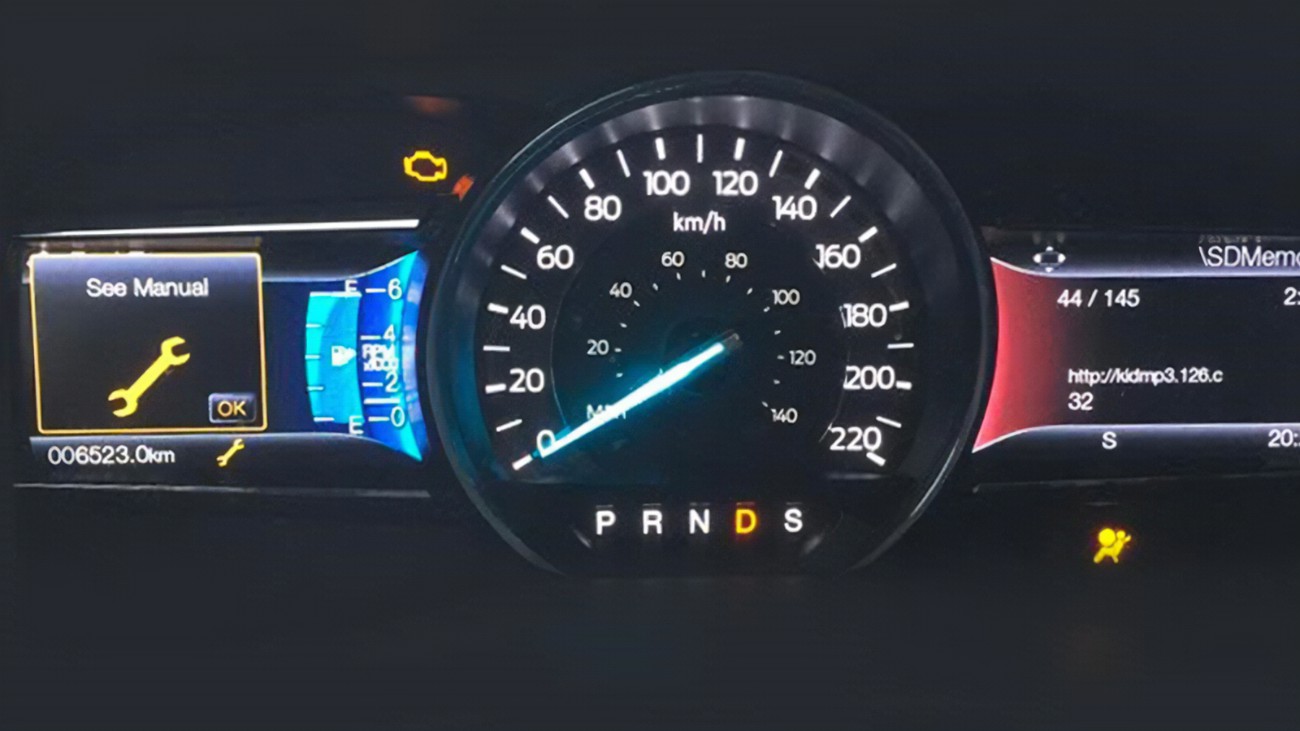
The yellow wrench means the PCM has flagged a powertrain issue. On Explorers, the most common single cause is an electronic throttle body fault (codes P2104, P2111, P2112, P2135). Symptoms include sudden loss of power, no throttle response, and the engine going into limp mode (limited rpm).
To diagnose:
- Plug in an OBD-II scanner (Autel, BlueDriver, Ancel BA101). Read codes.
- P2111 or P2112: throttle body stuck or actuator failed. Common in 2011-2019 Explorers with the 3.5L V6. Throttle body replacement runs $300 to $600 parts and $150 to $250 labor.
- P2135: throttle position sensor disagreement. Sometimes fixed by cleaning the throttle body, sometimes requires replacement.
- U codes (U0100, U0140): module communication faults. Often a wiring or connector issue, sometimes the module itself.
After replacing a throttle body, the PCM needs a relearn procedure: key on with engine off for 30 seconds, then key off for 10 seconds, then start and let idle for 60 seconds. Some scanners can command a relearn directly.
The battery reset that fixes a lot of glitches
Disconnect the negative battery terminal. Press and hold the brake pedal for 30 seconds (this drains capacitor power). Wait 15 minutes. Reconnect. Start the truck.
This clears stored codes that the system kept after a temporary fault (electrical noise from a jump start, momentary sensor dropout, etc.). About 30% of TMS warnings on 2011-2019 Explorers clear with this procedure. After reconnecting, you may need to redo:
- Power window auto-up/down learn (hold the switch up for 5 seconds after first close)
- Steering angle reset (drive straight 100 feet)
- Idle relearn (60 seconds at idle, then a short drive)
If the warning comes back within a week, the underlying fault is real.
False warnings from failing sensors
Wheel speed sensors, yaw rate sensors, and steering angle sensors all feed into the TMS. A dirty or marginal sensor sends out-of-range data that the TMS reads as a drivetrain problem.
Common failure points on 2011-2019 Explorers:
- Front wheel speed sensors ($30 to $80 each, 1 hour labor). Fail from road salt and brake dust. Code C0035 or C0040.
- Yaw rate sensor ($150 to $300, 30-minute install). Lives behind the center console. Code C2200.
- Steering angle sensor (built into the clock spring, $250 to $500). Code C0051.
Always scan first. Replacing parts on guesses gets expensive fast.
Software updates
Ford has issued multiple TSBs for TMS-related issues on Explorers. Open recalls and TSBs can be looked up by VIN at ford.com/support or at any Ford dealer. A dealer software update is usually free if there’s an active TSB, even outside warranty.
2020+ Explorers receive over-the-air updates through FordPass. Make sure your truck is connected and updates are current before chasing a hardware fault.
Ford recall 26C10 affecting trailer-equipped Explorers
Ford recall 26C10 (NHTSA 26V104000) covers 4.3 million vehicles including 2022-2026 Ford Explorer for an Integrated Trailer Module software fault. This recall touches trailer wiring and brake controller signal paths. If your Explorer’s TMS warnings appeared after towing or after a trailer plug event, check FordPass or VIN at NHTSA for the OTA fix. Pushed starting March 2026.
When to take it to a dealer
- Codes you can’t clear after the obvious fixes
- AWD warning combined with TMS warning (transfer case or PTU fault)
- Burning smell or unusual noise from drivetrain
- Failure to engage 4WD when commanded
Diagnostic at a dealer runs $150 to $250, refunded against repairs at most shops.
Why I prefer scanning before swapping
Sensors look cheap individually. Swap three on a guess and you’re $400 into parts you didn’t need. A $30 OBD-II reader plus an hour with a phone app and a forum search will narrow most TMS faults to a single component.